
NEW
Proxify is bringing transparency to tech team performance based on research conducted at Stanford. An industry first, built for engineering leaders.
Learn more
Software Engineering
Dec 23, 2025 · 12 min read
Serverless doesn’t mean free: Tradeoffs every engineering team should know
The promise of serverless computing is compelling: write code, deploy it, and pay only for what you use. No servers to manage, automatic scaling, and theoretically lower costs. However, many engineering teams that have adopted serverless have noticed a common pattern.

Vinod Pal
Fullstack Developer
Verified author

Table of Contents
- What is serverless (and how does it cost you)?
- The hidden cost structure of serverless
- 1. Execution time vs resource utilization
- 2. The cold start tax
- 3. Memory allocation and the CPU coupling
- Storage and data transfer: The silent cost drivers
- 1. Database connection costs
- 2. Data transfer between services
- 3. Storage integration costs
- Network and integration overhead
- 1. API gateway and load balancer costs
- Third-party service integration
- Case studies: Serverless costs in action
- 1. Coca-Cola: Cutting infra costs for vending transactions
- 2. iRobot: Scaling IoT with serverless microservices
- 3. Auxis case study: Cutting 66% of cloud costs
- Real-world cost optimization strategies
- When serverless costs make sense
- Making informed decisions
- Find a developer
The initial excitement of "serverless means cheaper" often gives way to surprisingly high cloud bills and complex cost optimization challenges.
This isn't an argument against serverless, but rather a call for engineering leaders to understand the real cost dynamics at play. Serverless can absolutely be more cost-effective than traditional infrastructure, but only when teams understand and actively manage its unique cost characteristics.
What is serverless (and how does it cost you)?
Contrary to common belief, serverless computing isn’t about “no servers”. It’s about letting the cloud provider (Azure, AWS, GCP, etc) handle all the infrastructure while you focus on writing and deploying code. Instead of renting out the entire virtual machine, you only pay for what you use.
Think of it like electricity: with traditional servers, you pay for the light bulb whether it’s switched on or off (idle or busy). With serverless, you pay only when the bulb is lit. This makes it appealing for workloads with unpredictable or bursty traffic because you avoid paying for idle capacity.
The cost model is simple on paper. Charges are based on:
- Number of executions
- Duration of each execution
- Resources (memory/CPU) allocated per execution.
But as many teams have learned, the simplicity hides a range of nuances: cold start penalties, data transfer charges, API gateway costs, and optimization tradeoffs that can quickly make or break your budget.
Boost your team
Proxify developers are a powerful extension of your team, consistently delivering expert solutions. With a proven track record across 500+ industries, our specialists integrate seamlessly into your projects, helping you fast-track your roadmap and drive lasting success.
The hidden cost structure of serverless
Traditional server costs are predictable. You rent a machine with a specific CPU and memory, and you pay for it whether it's sitting idle or running at full capacity. Serverless flips this model by making you pay for actual execution time and resource consumption.
1. Execution time vs resource utilization
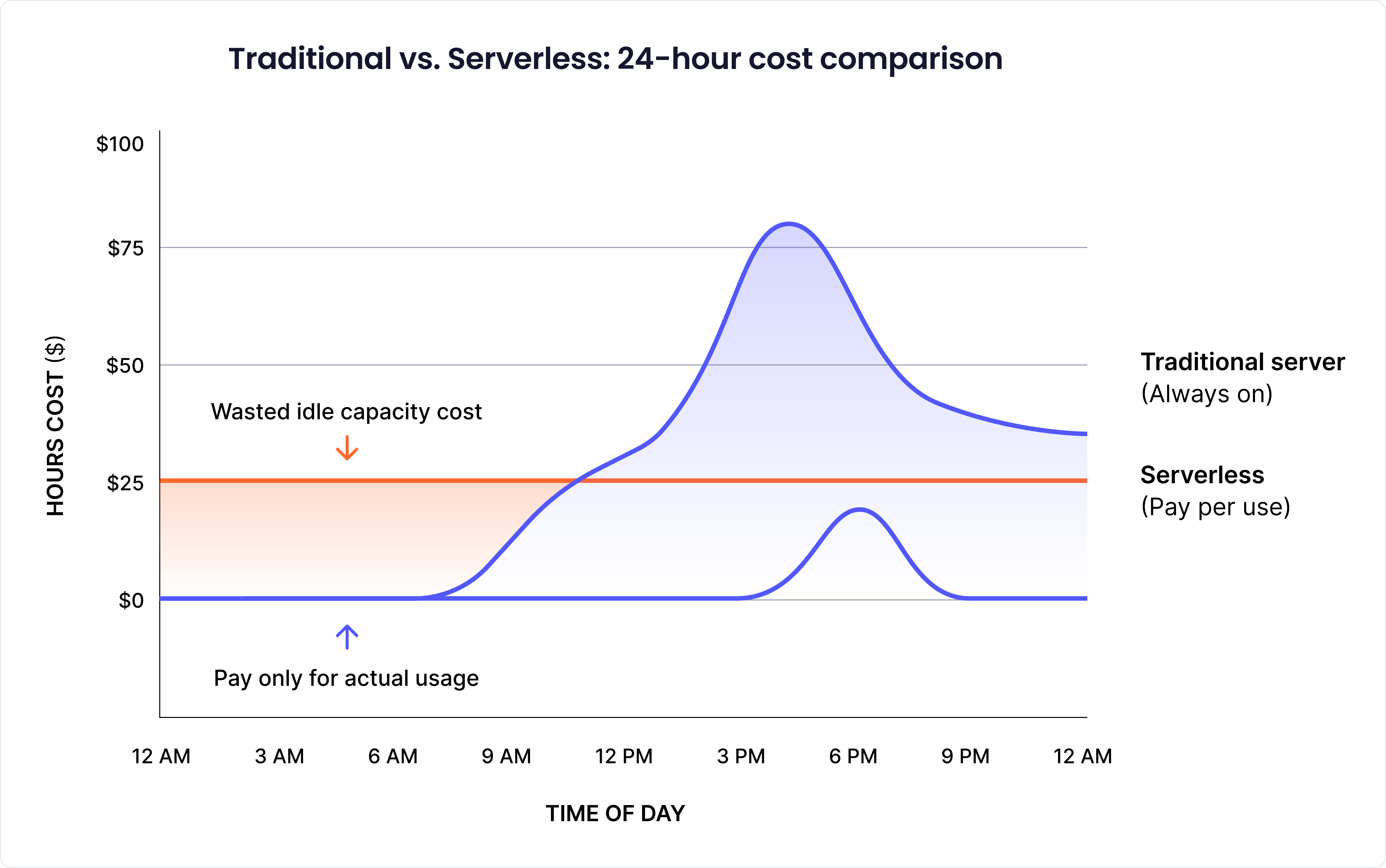
On traditional servers, you pay for the machine whether your API is busy or idle, often wasting money during off-peak hours. Serverless eliminates this idle cost by charging only when code is executed. However, it can also be expensive if used incorrectly. For example, a function that should take 500ms but is taking 5 seconds due to poor optimization will end up costing 10 times more, so every millisecond matters.
2. The cold start tax
When the server is idle, it goes into sleep mode. Therefore, next time a new request is made, it must re-initialize everything again. This is known as a cold start. This can add a few seconds of latency, and you have to pay for it. For a system with sporadic traffic, cold starts mean a significant unused bill. Teams often counter this with warming strategies, function consolidation, or tools like AWS Compute Optimizer.
3. Memory allocation and the CPU coupling
On most platforms, CPU is tied to memory allocation. More memory unlocks more CPU, even if the memory isn’t used. This can make larger allocations cheaper overall. For example, an image-processing function might drop from 15 seconds at 512MB to 3 seconds at 2GB, resulting in a cost reduction of ~60%. For CPU-bound workloads, allocating “extra” memory often pays off.
Storage and data transfer: The silent cost drivers
Traditional applications maintain persistent database connections, reusing them across multiple requests. Serverless functions, especially those experiencing frequent cold starts, establish new database connections regularly.
1. Database connection costs
Database connection establishment isn't just about latency but also about cost. Each connection consumes memory and CPU resources on your database server. If you're running managed database services, these resource spikes can push you into higher pricing tiers or trigger automatic scaling events.
Real-world database scaling scenarios highlight this cost multiplier effect. Consider serverless functions creating thousands of database connections per hour during peak traffic. Managed database services like Amazon RDS automatically scale to handle connection load, but each connection consumes memory and CPU resources on the database server.
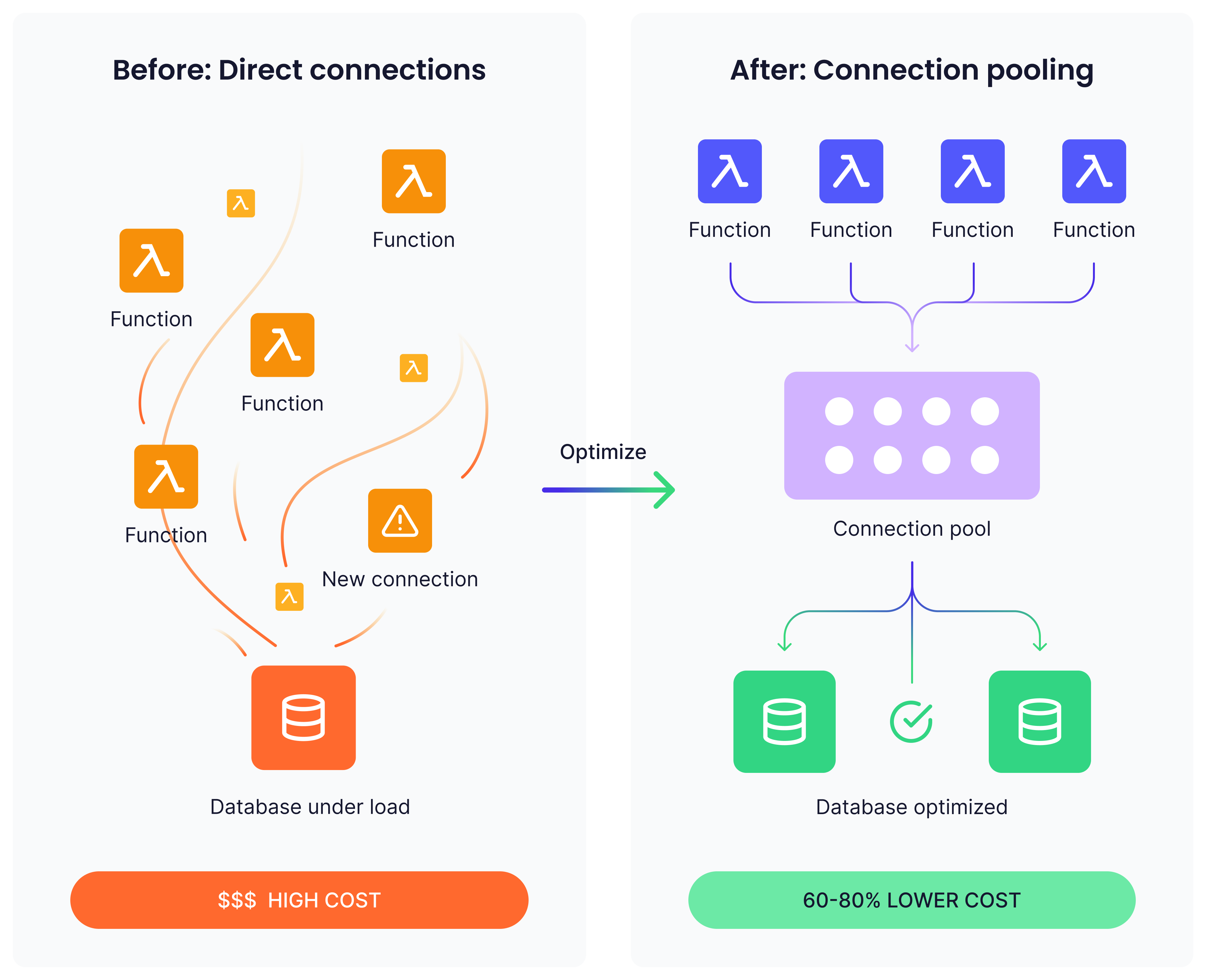
Connection pooling services like Amazon RDS Proxy can reduce database scaling requirements. In typical implementations, this approach reduces database connection overhead by 60-80% while significantly cutting associated scaling costs.
2. Data transfer between services
Serverless architectures often embrace microservices patterns, with functions calling other functions or external services. Each of these network calls incurs data transfer costs that can accumulate quickly.
Data transfer costs accumulate quickly in distributed serverless architectures. Consider a typical e-commerce order processing workflow, which includes validation, inventory checking, payment processing, and confirmation messaging. If each step transfers 50KB of data and you process 100,000 orders monthly, that represents 15GB of inter-service data transfer, potentially costing hundreds of dollars in transfer fees alone.
3. Storage integration costs
Serverless functions often integrate with object storage services for input and output. While storage costs themselves are typically low, the API calls to access storage can be significant. Reading 1 million small files from object storage might cost more in API calls than the actual storage of those files.
Network and integration overhead
HTTP-triggered serverless functions typically sit behind API gateways or load balancers. These services charge per request, often adding $3-5 per million requests on top of your function execution costs.
1. API gateway and load balancer costs
For high-traffic mobile applications, API gateway costs can often exceed the costs of function execution. A mobile app backend handling 50 million API calls monthly might spend $150 on Lambda execution but $250 on API Gateway fees at standard rates of $3-5 per million requests.
Third-party service integration
Serverless functions frequently integrate with external services such as payment gateways or email providers. These third-party integrations introduce additional latency, which in turn increases the cost.
Third-party integration inefficiencies can create significant cost multipliers. Marketing automation platforms often trigger multiple serverless functions for single user actions. If each function independently calls external analytics APIs, a single user interaction could generate 5 separate external API calls.
Consolidating these calls through function coordination or caching can reduce both external service costs and overall execution time.
Case studies: Serverless costs in action
Theory and benchmarks only go so far. What really matters is how serverless performs in production. Many companies have shared their journeys publicly, which reveal both the advantages and the hidden cost trade-offs of adopting serverless solutions.
1. Coca-Cola: Cutting infra costs for vending transactions
Coca-Cola originally ran its vending machine payment backend on six EC2 t2.medium servers, incurring costs for load balancers, servers, and idle capacity on a year-round basis. After migrating the workflow to API Gateway + AWS Lambda, they only paid for actual invocations.
- Traffic: ~30 million requests/month
- Cost before (EC2): ~$12,864/year
- Cost after (serverless): ~$4,490/year
- Savings: ~65–70%
However, their analysis also revealed a break-even point at ~80M hits/month, beyond which EC2 or reserved instances would have been more cost-effective. The lesson: serverless wins big at moderate scale, but high sustained traffic can erode those savings (AWS Coca-Cola serverless blog).
2. iRobot: Scaling IoT with serverless microservices
iRobot, maker of the Roomba, runs millions of connected devices worldwide. They leaned heavily on AWS Lambda and IoT services to scale their backend (AWS iRobot case study). Serverless gave them the ability to handle unpredictable spikes in device telemetry and commands.
But cost wasn’t the only lesson. They discovered new challenges:
- Managing cold starts across thousands of functions
- Avoiding runaway costs from inter-service communication
- Building custom tooling (“Cloudr”) to track dependencies and costs
For iRobot, the trade-off was clear: serverless unlocked scale quickly, but required serious investment in monitoring and internal tools to keep costs and complexity under control.
3. Auxis case study: Cutting 66% of cloud costs
Consultancy Auxis worked with a client running workloads on AWS Lambda and related services (Auxis case study). Through systematic cost optimization, right-sizing memory, batching invocations, and reducing unnecessary data transfer, they achieved:
- 66% AWS cost reduction
- Improved budget predictability across environments
This case highlights a crucial truth: even after moving to serverless, continuous cost governance is mandatory.
Real-world cost optimization strategies
Optimizing serverless costs is not just about how efficient your code is. It also includes the way your system is structured and how well you measure the costs over time. Let’s see all these strategies in detail:
1. Function duration and resource optimization
The most impactful improvements typically result from making functions faster and more efficient. Unlike traditional servers, where throughput optimization is often the primary focus, serverless optimization is primarily concerned with reducing latency. How quickly does each request complete?
Practical techniques include:
- Minimize cold starts by keeping initialization lightweight
- Cache expensive computations or repeated queries within the same execution context
- Trim dependencies to avoid longer cold starts from unnecessary libraries
On the infrastructure side, tuning memory and CPU is equally important:
- Profile functions under real-world load to uncover usage patterns
- Experiment with different memory allocations; sometimes allocating more memory reduces execution time enough to lower total costs
- Balance latency vs. resource usage until you find the sweet spot
2. Architectural patterns for cost efficiency
Once your code is optimized, the next cost saving comes from the architecture design used in the serverless function. Some of the common architectural patterns are:
- Function consolidation: Group the related functions into a single function. This reduces cold starts, thus saving costs.
- Batch processing: It’s always good practice to process the data in bulk. A single invocation handling 100 requests is still far cheaper than 100 invocations handling single requests. This is because serverless charges per invocation.
- Async processing: Long-running jobs can be run using async processing. This allows background functions to be optimized purely for cost.
3. Monitoring and cost attribution
Even the best optimizations fail without visibility. Cloud billing dashboards are often too high-level; real savings come from granular monitoring.
Key metrics to track:
- Cost per function invocation
- Execution duration and cold start frequency
- Memory utilization and data transfer volumes
To connect costs back to business value:
- Tag functions by team, product, or environment
- Track cost per transaction, not just per invocation
- Monitor trends to catch features that disproportionately drive spend
For example, if using the insights, a company can tell that most of its users only use the services during the daytime. Then they can adjust their function availability to reduce the overall cost.
When serverless costs make sense
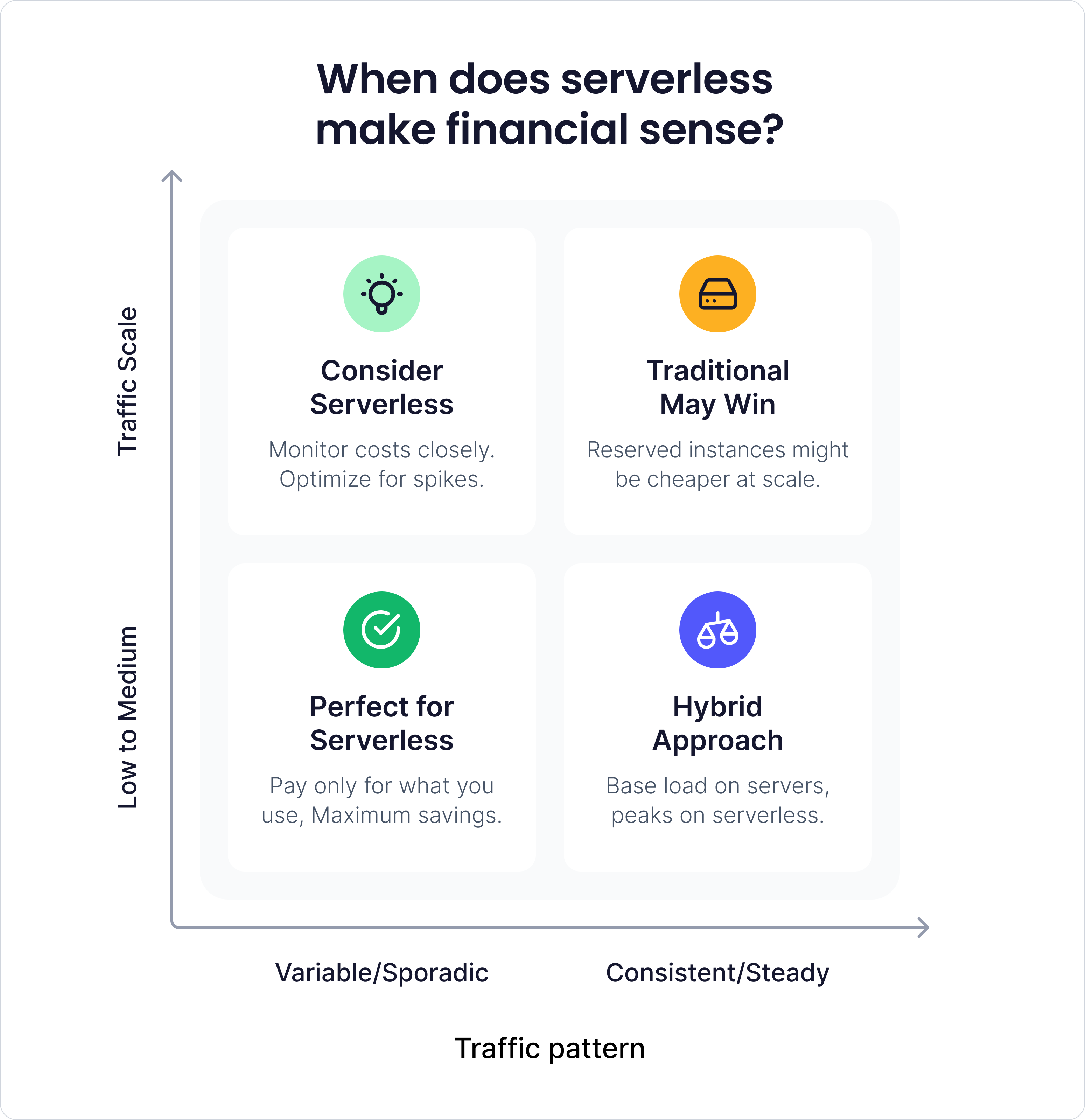
Instead of completely avoiding serverless, it should be used strategically. The trick is knowing when it actually pays off.
A few common scenarios:
- Variable traffic: If your app sits idle most times and gets used in spikes now and then, serverless can actually save you money since you only pay when it runs.
- Faster delivery: No servers to babysit, built-in scaling, and monitoring baked in. That frees your team to ship features quicker — and speed to market often matters more than the raw compute bill.
- Event-driven work, such as image processing, data cleanup, or webhook handling, is a natural fit. With these event-driven tasks, the serverless solution will only incur costs when they run.
Making informed decisions
Instead of looking for a "cheap" alternative to serverless, the goal should be to make the pricing of serverless more predictable and transparent. This requires serverless cost optimization, a regular practice rather than a one-time migration activity.
Before adopting serverless for new workloads:
- Model expected costs based on realistic traffic patterns
- Factor in all associated costs (API gateways, data transfer, storage)
- Consider the operational overhead savings as part of your cost analysis
For existing serverless workloads:
- Implement comprehensive monitoring and cost attribution
- Regular performance profiling and optimization cycles
- Evaluate whether traffic patterns still match serverless cost models
The teams that succeed with serverless in the long term are those who accept its unique advantages rather than sticking with a traditional cost structure. They optimize for execution efficiency, design architectures that minimize cold starts, and treat cost optimization as a core engineering practice.
Serverless isn’t free, but it can give you predictable and scalable costs when used intentionally. The key is to make intentional trade-offs when dealing with serverless.
Was this article helpful?


Verified author
We work exclusively with top-tier professionals.
Our writers and reviewers are carefully vetted industry experts from the Proxify network who ensure every piece of content is precise, relevant, and rooted in deep expertise.

Vinod Pal
Fullstack Developer
8 years of experience
•
Expert in Fullstack
Vinod Pal is a Senior Software Engineer with over a decade of experience in software development. He writes about technical topics, sharing insights, best practices, and real-world solutions for developers. Passionate about staying ahead of the curve, Vinod constantly explores emerging technologies and industry trends to bring fresh, relevant content to his readers.
Related articles
 Feb 18, 2026
•
Vinod Pal
•
11 min readThe real bottlenecks behind scaling databases and how to spot them
 Jan 13, 2026
•
Vinod Pal
•
11 min readA practical approach to implementing cross-cutting concerns at scale
 Nov 20, 2025
•
Vinod Pal
•
11 min readThe hidden risks in acquired codebases (and how to uncover them fast)
Find your next developer within days, not months
In a short 25-minute call, we would like to:
- Understand your development needs
- Explain our process to match you with qualified, vetted developers from our network
- You are presented the right candidates 2 days in average after we talk